For a long time I have been trying to learn SOA but to no avail.
I go through several documents but they are more of a bouncer.
So I thought lets do it the regular way starting with Installation.
So this post covers my issues with SOA.
Prerequisite
1> Download Oracle Weblogic Server ( :) I already had it installed)
2> A database (I already have an Oracle XE database installed)
XE database is not supported but then I am sure it will work for a development environment for testing purpose
3> RCU.
All available for download from OTN (Oracle technology Network).


And yes, you will have to remove certain components but then that is ok because all we want is SOA.

So remove Oracle Identity Manager, Oracl Adaptive Access Manager, Spaces and Service, portal


I go through several documents but they are more of a bouncer.
So I thought lets do it the regular way starting with Installation.
So this post covers my issues with SOA.
Prerequisite
1> Download Oracle Weblogic Server ( :) I already had it installed)
2> A database (I already have an Oracle XE database installed)
XE database is not supported but then I am sure it will work for a development environment for testing purpose
3> RCU.
All available for download from OTN (Oracle technology Network).
The document is going to cover several issues that I faced
on the install.
Starting with creating an RCU on oracle XE database.
While Installing the RCU on Oracle XE Database.
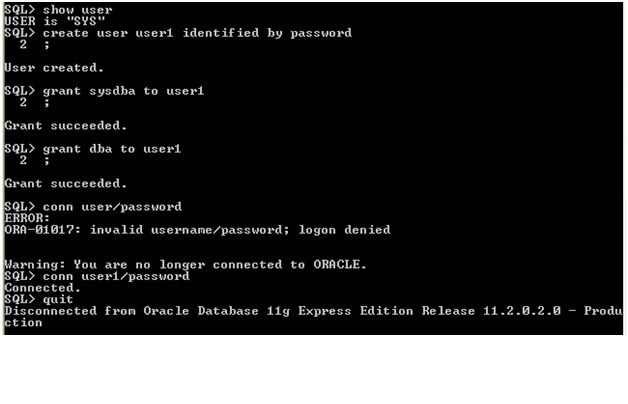
The first problem that I faced is creating a SYSDBA user I
tried using SYS but it would just not connect.
I know many of you folks out there are experienced DBA’s and
you might laugh out on my knowledge but then I am from the middle ware team.
So, out of several things that I tried was using the apex
GUI but could not get around it.
So I was back to the usual SQL Plus using SQL J.

So now I have a user named user1 which is a SYSDBA.
I though I could go ahead with it but turns out I was wrong.
I got two of the below errors.
ERROR rcu: oracle.sysman.assistants.rcu.backend.action.AbstractAction::handleNonIgnorableError: Received Non-Ignorable Error: Error creating PL/SQL Object WRITE_LINE:PROCEDURE
ERROR rcu: oracle.sysman.assistants.rcu.backend.action.AbstractAction::handleNonIgnorableError: Received Non-Ignorable Error: Error creating PL/SQL Object DEBUG_PURGE:PROCEDURE
This was resolved after assistance from the blogpost
And the solution is to
1>
grant execute on sys.dbms_lock to user1 with
grant option
2>
set the Environment variable
RCU_JDBC_TRIM_BLOCKS to TRUE
For Windows set it through
a>
right click on My Computer -> Properties
-> Click On Advanced
b>
Click on Environment Variables towards the bottom
c>
Then in System Variables add in new
There is an easier way of doing it.
Instead of double clicking the rcu.bat open a command prompt
and then run the below
set RCU_JDBC_TRIM_BLOCKS = TRUE
After this cd to the RCU directory and execute rcu.bat
After this installing RCU was pretty much a cake walk just
with certain messages like below


For the custom variables screen this oracle document was very important

Then Click Next, Next Next and then finally you get the
success screen

